SUAP → Moodle Synchronization
This guide explains what happens behind the scenes in Moodle when the sync_up_enrolments service (see API & Services) receives a course/class structure from SUAP.
Practical Summary
As an educator or administrator, the practical result after synchronization is:
Organized rooms: campus, course, and term folders organized without manual effort.
Ready rooms: logbook room and course coordination room created automatically in the corresponding category.
Right people in the right places: students and teachers enrolled with active or suspended status in sync with SUAP Edu.
Group management: students automatically split into groups by hub, entry period, or class inside each room.
Vocabulary
SUAPThe Enterprise Resource Planning (ERP) system developed by IFRN.
SUAP EduAcademic management module of SUAP; holds official academic records (enrolments, grades, personal data).
MoodleThe Virtual Learning Environment (VLE / LMS) hosting online virtual classrooms.
Integrador AVAMiddleware bridging SUAP data and Moodle (the HTTP client calling
sync_up_enrolments).AVA PanelUnified web interface for accessing rooms across multiple Moodle instances.
CategoryMoodle course category.
RoomMoodle course (virtual classroom).
UserMoodle user account, matching a SUAP account 1-to-1.
EnrolmentMoodle enrolment associated with role assignments.
GroupMoodle course group.
CohortMoodle system-wide site cohort.
Synchronization Execution
Synchronization is triggered by HTTP calls to sync_up_enrolments:
Synchronous: if payload contains
"sincrono": true, processing happens directly in the HTTP request.Asynchronous (Default): structure is created instantly and an adhoc task (
sync_up_enrolments_task) processes user enrolments, groups, and suspensions in background.
Synchronization Flow in Moodle
In each execution, Moodle processes two room types:
Once for the course coordination room;
Once for the student classroom (logbook/diário, self-enrolment, practicals, or models).
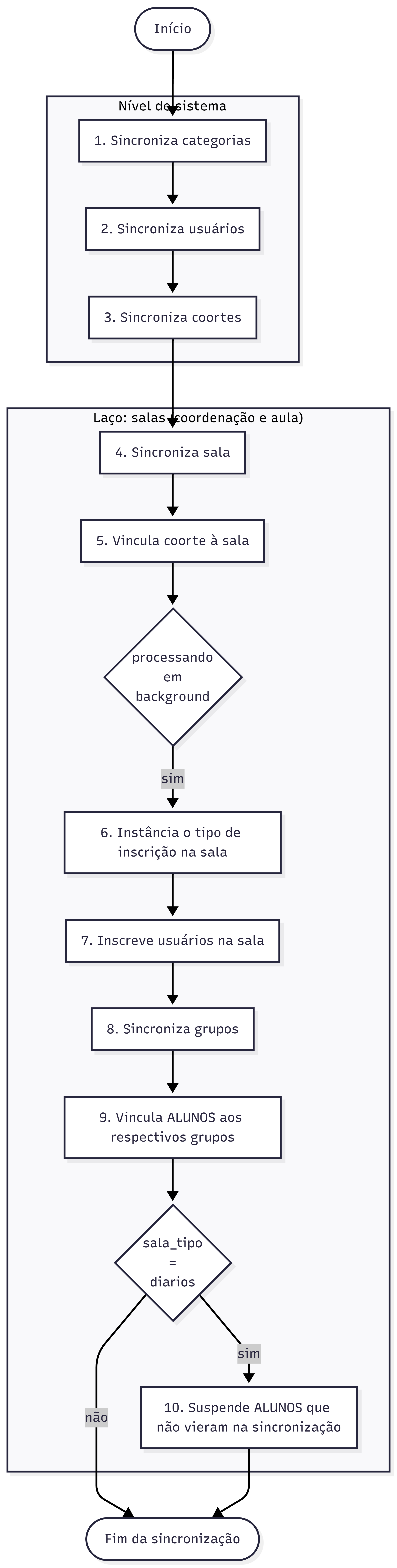
Step-by-Step Breakdown
1. Category Sync
Guarantees category hierarchy: Root (Diários) → Campus → Course → Term → Class (Turma). Missing folders are automatically created.
2. User Sync
Creates missing accounts (with authentication method resolved by auths_mapping/default_auth) and updates profile fields (email, name, hub, program).
The email is taken from the first non-empty of email_preferencial, email, email_secundario, email_google_classroom and email_academico. If SUAP sends none, new users get <username>@sem-email.invalid and existing users keep their current email.
3. Cohort Sync
Creates or updates system-wide cohorts and adds cohort members.
4. Room/Course Sync
Classifies room type (coordenacoes, autoinscricoes, praticas, modelos, diarios) and sets custom course fields. New rooms are created hidden (visible = 0).
5. Cohort Linking
Enrols cohort into room using enrol_cohort method.
6. Enrolment Method Instantiation
Ensures required enrolment instance exists in room according to roles_mapping.
7. User Enrolment
Enrols users with assigned roles; suspends accounts (ENROL_USER_SUSPENDED) if user status in SUAP is inactive.
8 & 9. Group Sync & Student Group Assignment
Subdivides students inside room into Entry, Class, Hub, and Program groups.
10. Automatic Suspension of Missing Students
For diarios room type: suspends enrolled students who are no longer listed in the latest SUAP synchronization payload.
Technical Architecture Reference
Primary orchestration in api/sync_up_enrolments.php (sync_up_enrolments_service::process()):
sync_categories() → sync_users() → sync_cohorts()
  → for each room type (coordination, classroom):
      sync_course() → sync_enrols_cohorts()
        → if synchronous/background worker:
            sync_enrols_manuals() → sync_enrolments() → sync_groups()
              → if room_type == 'diarios':
                  suspend_students_not_in_list_all_enrols()